Other CAD Formats
- Copy Page Tree
- Brian Carter (Unlicensed)
The following formats can be read by TurboCAD LTE Pro, either for import, export, or both. Some formats have a Setup in which you can set certain parameters for conversion. If you do not specify conversion parameters, the defaults will be used. (If no Setup is indicated, the conversion requires no additional input.)
Note: Most of these formats are Available in TurboCAD LTE Pro only.
3DS: AutoDesk 3D Studio format.
3DV: VRML Worlds (import only)
ASAT: ACIS solid modeling file format for storing graphics as ASCII files.
BMP: Bitmap format, TurboCAD for Windows (export only). A bitmap is a representation of a graphic image consisting of rows and columns of dots.
CGM: Computer Graphics Metafile. (Available in LTE)
DAE: Collada files (export only).
DCD: DesignCAD (import only)
DGN: Intergraph Standard file format.
DWF: Drawing Web format. Import is automatic.
DWG: AutoCAD native format for vector graphics. (Available in LTE)
DXF: Drawing eXchange format, used by AutoCAD to interact with other applications. (Available in LTE)
EPS: Encapsulated Post Script format.
FCD: FastCAD DOS format (import only)
FCW: FastCAD Windows format (import only).
GIF: Raster graphic format (export only).
GEO: VRML Worlds (import only)
IGS: IGES format.
Note: IGS is a file format for a public domain called IGES which is actually a neutral file format intended as an international standard for the exchange of data between different CAD/CAM systems. IGES is an ANSI standard maintained by the IGES/PDES Organization (IPO), under the direction of the National Institute of Standards and Technology (NIST). The National Computer Graphics Association (NCGA) acts as the administrator of the standard.
JPG: JPEG image compression standard, full 24-color. TurboCAD for Windows (export only).
JPG: JPEG format, SDK sample filter (export only)
MTX: MetaStream format. This format enables the creation, delivery, and viewing of scalable 3D graphics. It enables you to view images with Web browsers equipped with 3D plug-in software, and to interact with 3D Web graphics in real time by zooming, panning, or rotating objects within a Web browser. It also scales objects in real time to match the performance of your system. MetaStream compresses 3D geometry and texture information, so that files can be delivered quickly to your machine.
OBJ: Geometry definition format.
PLT: Hewlett-Packard Graphics Language. (Available in LTE)
PNG: Raster graphic format (export only).
PDF: Adobe Portable Document Format
PDF(3D): Adobe 3D Portable Document Format
SAT: ACIS solid modeling file format for storing graphics as ASCII (SAT - Save As Text) files.
SHX: Format that saves selected entities as a single shape, that can be used in a line style (export only). This is not the same as *.shx font format.
SKP:
STL: Stereo Lithograpy format.
STP, STEP: Step format.
SVG: Web graphic format (export only).
U3D: Universal 3D (U3D) is a compressed file format standard for 3D computer graphics data.
WMF: Windows MetaFile format, saves graphics as a series of records that correspond to graphics function calls, such as drawing straight lines, curves, filled areas, and text. (Available in LTE)
WRL: Format for saving graphics as a Virtual Reality Model Language (VRML) description.
WRZ: VRML Worlds
XLS: Spreadsheet format (export only)
SKP File Import Setup
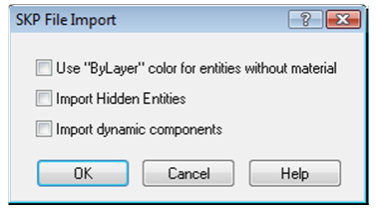
Use "ByLayer" color for entities without material: Assign the SketchUp layer color to any entity that does not have an assigned material.
Import Hidden Entities: Imports entities which are hidden in the SKP. If this option is off hidden entities will nor be imported.
Import dynamic components: Dynamic block are imported as PPM objects.
SKP File Export Setup
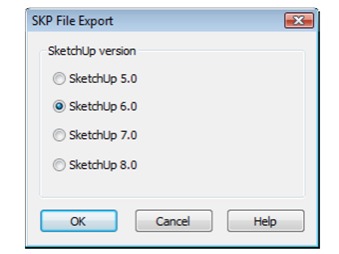
SketchUp Version: Specify the version of SketchUp SKP to be used in the file format: 5, 6, 7 or 8.
3DS File Import Setup
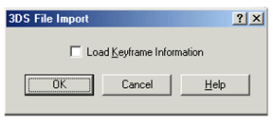
Load Keyframe Information: Accepts or ignores the keyframe 3DS file data.
3DS File Export Setup
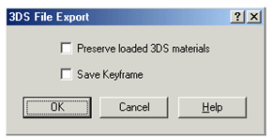
Preserve loaded 3DS materials: Saves unique materials from a 3DS file. If not checked, saves TurboCAD materials.
Save Keyframe: Saves the hierarchical structure of entities in a file. Do not check this option for 3DS files that you want to use as 3DS symbols in TurboCAD.
BMP Export Setup
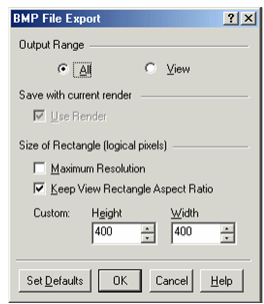
Output Range: Creates an export file either out of the entire drawing (All) or only the part that is currently in view (View).
Use Render: Available only when Render or Hidden Line mode is active. If checked, the exported image will show the render displayed on the screen.
Size of Rectangle: Sets up the resolution for the exported graphics. By default, these values are 400 x 400 but you can customize the height and width
Maximum resolution: The drawing will be defined by a rectangular matrix of 2000 x 2000 logical pixels. If there is at least one image object, this is set to 1000 x 1000.
Keep View Rectangle Aspect Ratio: Keeps the same ratio of length to width.
Note: You can determine an object's type by using the Selection Info Palette. See Selection Info Palette.
CGM Import Setup
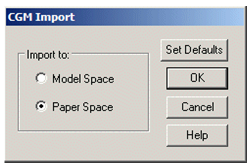
Choose to open the file either in Model Space or Paper Space.
DAE Export Setup
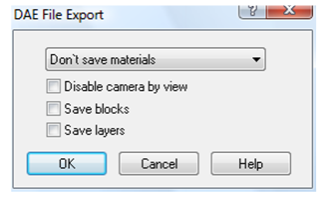
Don't save materials: Objects colors will remain the same.
Save materials: For objects that have textures, the imported objects will refer to texture graphics in the TurboCAD folders.
Save materials and copy textures: Creates a local copy of texture files into the folder where the exported file is saved.
Disable camera by view: Specifies whether a camera is added to the model (the camera is based on the current view).
Save Blocks: Block are saved as instances within the Collada file.
Save Layers:: Layers are saved in the Collada file.
DGN Import Setup
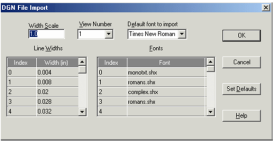
View Number: By default, the view number is 1.
Line Widths: You customize a set of drawing line widths identified by the indexes (0, 1, 2, etc.). To do this, use the two-column Line Width control ,where the Index column provides a reference to a particular line width, and the Width column is a data entry field. You can scale the line width values, using the Width Scale data entry field.
Fonts: As with the drawing line widths, the import file's fonts are indexed. For every index in the Index column, you can select a font from the corresponding drop-down list in the Font column. In addition to the options of the Fonts control, there is the Default Font entry field whose drop-down list lets you select a common font for the ones you haven't changed.
Set Defaults: Instead of customizing the imported file options, you can apply the default settings for the DGN file import. To do this, click Set Defaults.
DGN Export Setup
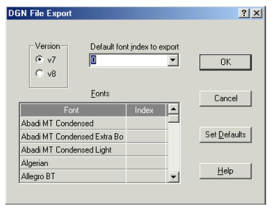
Version: Choose between Versions 7 and 8.
Default font index to export: The DGN format requires the export file's fonts to be indexed. For every listed font, you can select an index. In addition to the options of the Fonts control, there is the Defaul
Index entry field whose drop-down list lets you select a common index for the fonts you have not changed.
DWF Export Setup
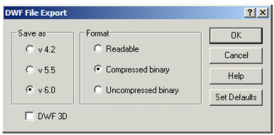
Output Format: If Readable is selected, you can later open the exported file to view and/or edit via a text editor.
Skip Invisible Layers: Invisible layers will not be included in the export file. See Snap Modes.
DWF 3D: DWF files of 6.01 format will be created. Files will contain all elements from Model Space, including 3D.
Note: TurboCAD does not support importing from this format. DWF files created with this option can be viewed either in Autodesk DWF Viewer (v6.01 and up), or in other applications that support this format.
DXF (DWG) Import Setup
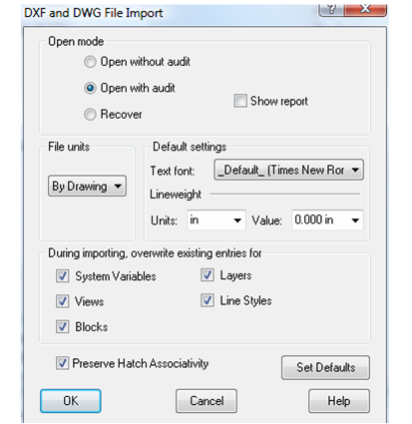
Open mode:
Open without audit: Opens the file without checking it. If the file has errors, it will not be opened.
Open with audit: Opens the file and corrects errors when possible. The report is displayed only if errors are found. The file is checked is after it is loaded into memory, though if the file is very corrupt it may not be able to be loaded into memory.
Recover: Opens the file and corrects errors. The report is automatically displayed, regardless of errors. The file is checked before loading it into memory.
File Units: Replaces the units of an imported file with the selected units.
Default text font: Sets a default import font.
Lineweight Unit and Value: Defines how objects using the AutoCAD default line weight are treated on import.
Overwrite existing entries for: AutoCAD stores the settings (or values) for its operating environment and some of its commands in system variables. Checking this box overwrites these settings. In TurboCAD, these settings include World units, the numerical display format, the angular system, etc.
You can overwrite system variables for objects under the following conditions: the DXF/DWG drawing is inserted into an open file, and both files (the imported file and the receiving file), have system variables (views, blocks, layers and/or line styles) of the same names.
DXF (DWG) Export Setup
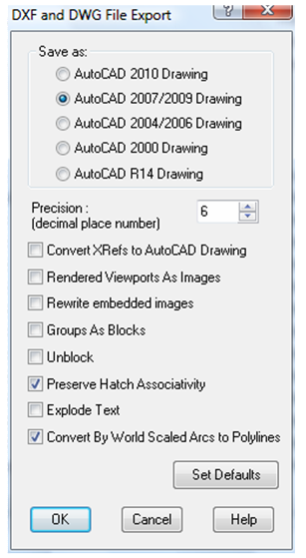
Save As: Select the AutoCAD version.
Precision: The number of decimal places for numerical values of the exported file.
Convert Xrefs to AutoCAD Drawing: Converts attached Xrefs into DWG files.
Rendered Viewports as Images: All viewports that have renderings will be converted to images, to preserve the appearance of the renderings.
Rewrite embedded images: Relevant for files that contain image objects. Choose whether to replace images.
Groups as Blocks: Displays objects included in groups as blocks when imported into AutoCAD.
Unblock: Explodes blocks into its constituent objects.
Preserve Hatch Associativity: Retains hatch association in the resulting DWG file.
Explode Text: Explodes any text into its constituent parts.
Convert By World Scaled Arcs into Polylines: All arc using the By World setting for line scaling will be converted into arc segments of polylines with a supported AutoCAD scaling method.
EPS Import Setup
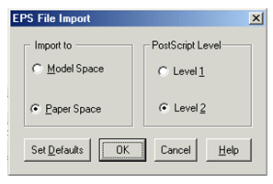
Import to: Choose whether the imported file will open in Model Space or Paper Space.
PostScript Level: Level 2 is a more sophisticated version of PostScript. It provides color extensions, support for fonts with many characters, filters (for compression, etc.) and improved image handling (inclusion of JPEG files, etc).
EPS Export Setup
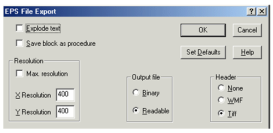
Explode Text: Explodes any text into its constituent parts.
Save block as procedure: Saves the drawing's blocks as procedures in the PostScript language.
Resolution: Sets the horizontal and vertical resolutions for the two-dimensional presentation of your drawing. Check Max Resolution to set the maximum 1600x1600 resolution.
Output file: Exports to a binary or readable format.
Header: Specify whether to include a preview image, and in what format.
FCW Import Setup
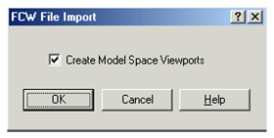
Create Model Space Viewports: Specify whether to create viewports for the Model Space presentation of your drawing.
GIF Export Setup
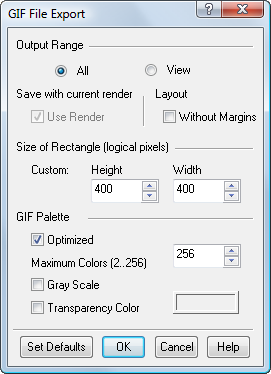
Optimized: Color palette optimization. If not checked, the initial color palette will imitate the Halftone palette, in which the color of a pixel is adjusted by mixing colors of adjacent pixels. If checked, the initial color palette will be optimized, containing no more colors than the number specified in Maximum Colors field.
Maximum Colors: Number of colors in the optimized palette (from 2 to 256).
Grayscale: The initial color palette will contain shades of gray.
Transparency Color: Sets the color that will be transparent. Available for optimized palette.
Layout - without Margins: Uses only the are within the margins to generate the GIF when the image is generated from a layout.
IGS Import Setup
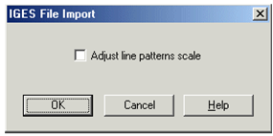
Adjust line pattern scale: Line style for improving line display. Because IGS files can be created in a variety of ways, either option (on or off) may work to improve precision during import.
JPG Export Setup
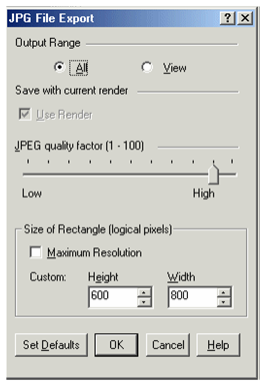
Output Range: Creates an export file either out of the entire drawing (All) or only the part that is currently in view (View).
Use Render: Available only when Render or Hidden Line mode is active. If checked, the exported image will show the render displayed on the screen.
JPEG quality factor: Your goal is generally to pick the lowest quality setting, or smallest file size, that decompresses into an image indistinguishable from the original. This setting can vary, but here are some rules of thumb. For good-quality, full-color source images, the default quality setting (Q 75) is very often the best choice. This setting is about the lowest you can go without expecting to see defects in a typical image. Try Q 75 first; if you see defects, then increase. If the image was less than perfect quality to begin with, you might be able to drop down to Q 50 without objectionable degradation. On the other hand, you might need a higher quality setting to avoid further loss. This is often necessary if the image contains dithering or moire patterns. Except for experimental purposes, avoid values above Q 95; Q 100 will produce a file two or three times as large as Q 95, but with negligible quality improvement.
Size of Rectangle: Sets the resolution for the exported graphics. By default, these values are 600 x 800 but you can customize the height and width
Maximum resolution: The drawing will be defined by a rectangular matrix of 2000 x 2000 logical pixels. If there is at least one image object, this is set to 1000 x 1000.
Note: You can determine an object's type by using the Selection Info Palette. See Selection Info Palette.
OBJ Export Setup
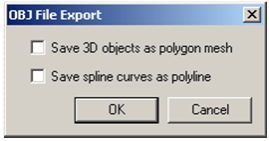
Save 3D objects as polygon mesh: When 3D objects are converted into a mesh, smoothness may be lost, but exact appearance will be preserved.
Save spline curves as polyline: When NURBS curves are converted to polylines, smoothness will be lost, but exact appearance will be preserved.
PDF Export Setup
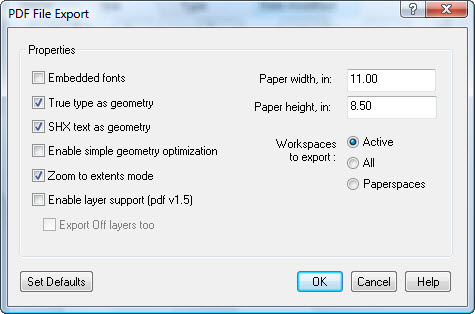
Embedded fonts: Fonts will be embedded in the PDF file, increasing the file size. If not checked, the PDF viewer (such as Adobe Reader) will select a font that exists in the system.
True type as geometry: True-type text will be exploded into a collection of lines.
SHX text as geometry: SHX text will be exploded into a collection of lines.
Enable simple geometry optimization: When checked, smaller PDF files will be created. This may affect the PDF quality.
Zoom to extents mode: Zooms into closest point, showing the full model.
Enable layer support (pdf v1.5): Add layers to the PDF. You can also opt to export Off layers as well.
Workspaces to Export: Select Active to export only the active Space, or All to export all Paper Spaces and Model Spaces.
Paper Width: set the paper Width of the PDF.
Paper Height: set the paper Height of the PDF.
PDF (Adobe PRC Based)
Export setup is fully automatic.
PDF (Adobe U3D Based)
Export setup is fully automatic.
PNG Export Setup
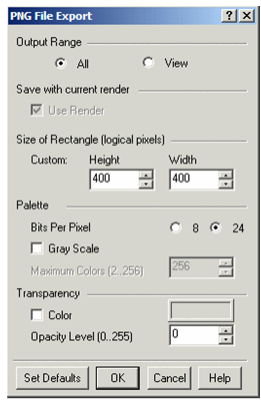
Bits Per Pixel: The number of bits per pixel in the saved image. A value of 8 means a 256-color palette; a value of 24 means True Color palette.
Gray Scale: The initial color palette will contains shades of gray.
Maximum Colors: Number of colors in the palette (from 2 to 256). Available if Bits Per Pixel = 8.
Color: Selection of transparency color. When Bits Per Pixel = 8, the pixels that have this color will be transparent. When Bits Per Pixel = 24, the pixels that have this color will get the level of opacity specified in the Opacity Level field. If Color is off, the level of opacity will be set for all pixels of an image.
Opacity Level: Level of opacity (alpha channel: from 0 to 255). Available if Bits Per Pixel = 24.
PLT Import Setup
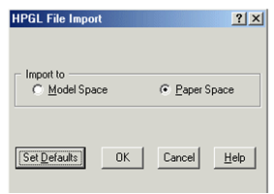
Import to: Choose whether to open the imported file in Model or Paper Space.
PLT Export Setup
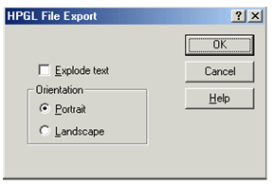
Explode text: Explodes any text into its constituent parts.
Orientation: Sets the paper orientation to Portrait (vertical) or Landscape (horizontal).
SAT Import Setup
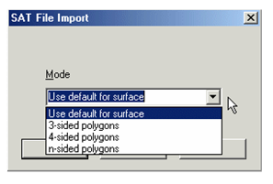
Mode: Choose one of the modes for representing SAT objects.
Default: The choice of the polygon type is determined by the surface type in the solid object model (planar, cylindrical, spherical, toroidal, etc.)
3, 4, n-sided polygons: The number of sides of polygons used for object representation.
If you wish to check what type of polygon is used for the object presentation in an imported SAT file, do the following.
- Once the SAT file has been imported, select an object in the drawing, make a block of it, and bring this block onto the paper of the TurboCAD desktop.
- Open the Properties window for this block, open the Block Insertion page, and assign non-zero values to the rotation coordinates.
- When a 3D view of your object is displayed, select the object and explode it.
- After this you can display individual elements (polygons) of the object by selecting the different parts of objects.
SAT Export Setup
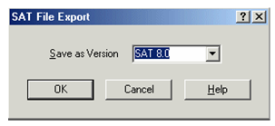
Select the SAT version for export.
SHX Export Setup
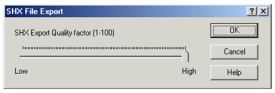
SHX Export Quality Factor: A high value creates shapes that more accurately represent the selected geometry. However, large values tend to create shapes that contain more coordinate data and can be a processing burden during regeneration. Low values create less accurate shapes that are more quickly processed. You may need to experiment with different values.
Note: SHX export does not create an *shx font file. Once created, the results cannot be edited.
STL File Export Setup
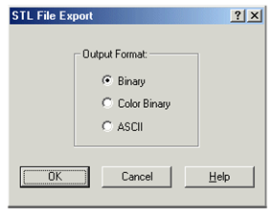
Binary: Saves to a binary file.
Color Binary: Saves to a color binary file.
ASCII: Saves to an ASCII text file.
WMF Import Setup
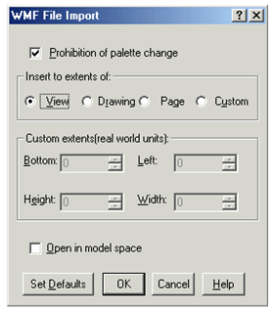
Prohibition of palette change: Prevents TurboCAD from changing the color palette.
Insert to extents of: Sets the size of the imported drawing.
View: The size is based on the current view.
Drawing: The size is based on the entire drawing.
Page: The size is based on the paper sheet.
Custom: Define your own size.
Custom extents: Enter coordinates and dimensions of the rectangle that encloses the drawing.
Open in Model Space: Opens the imported drawing in Model Space. The drawing is placed on the default By World workplane.
WMF Export Setup
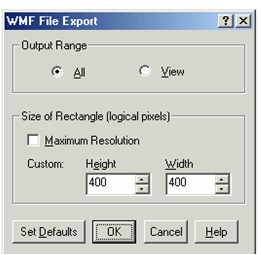
Output Range: Creates an export file either out of the entire drawing (All) or only the part that is currently in view (View).
Size of Rectangle: Sets the resolution for the exported graphics. By default, these values are 400 x 400 but you can customize the height and width
Maximum resolution: The drawing will be defined by a rectangular matrix of 8000 x 8000 logical pixels. If there is at least one image object, this is set to 1000 x 1000.
Note: You can determine an object's type by using the Selection Info Palette. See Selection Info Palette.
WRL Export Setup
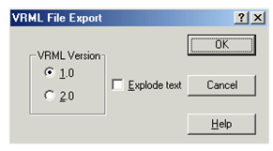
Select a version of VRML file to save. You can also explode the drawing text while creating the file for export.